




FITIV Pulse 10.9 Is Here: Progressive Overload, Plate Calculator, RIR Tracking, and More





If you train with weights, this update was built for you.
FITIV Pulse 10.9 is the biggest weightlifting update we have shipped, and it addresses the parts of strength training that no app has handled well enough: knowing when to push harder, understanding how much effort each session actually cost you, and getting set up at the rack without doing mental math.
This update is about removing friction from the things that matter. Less guesswork. More intentional training.
Update to FITIV Pulse 10.9 today and experience a smarter, more complete strength training workflow.
What's New in FITIV Pulse 10.9
Major Weightlifting Update

Progressive Overload
FITIV now automatically suggests when and how to increase your training load. Based on your recent performance, the app recommends the next weight, reps, or sets for each exercise so you are always moving forward without having to track it manually.
Progressive overload is the most important variable in long-term strength development. With 10.9, FITIV handles the math so you can focus on the lift.
Reps In Reserve (RIR) Tracking
Log how many reps you had left in the tank after each set, right alongside your weight and rep data. RIR is one of the most reliable indicators of training intensity, giving you a far more accurate picture of effort than volume alone.
When you combine RIR with Progressive Overload, FITIV can make smarter recommendations based not just on what you lifted, but on how hard each set actually was.
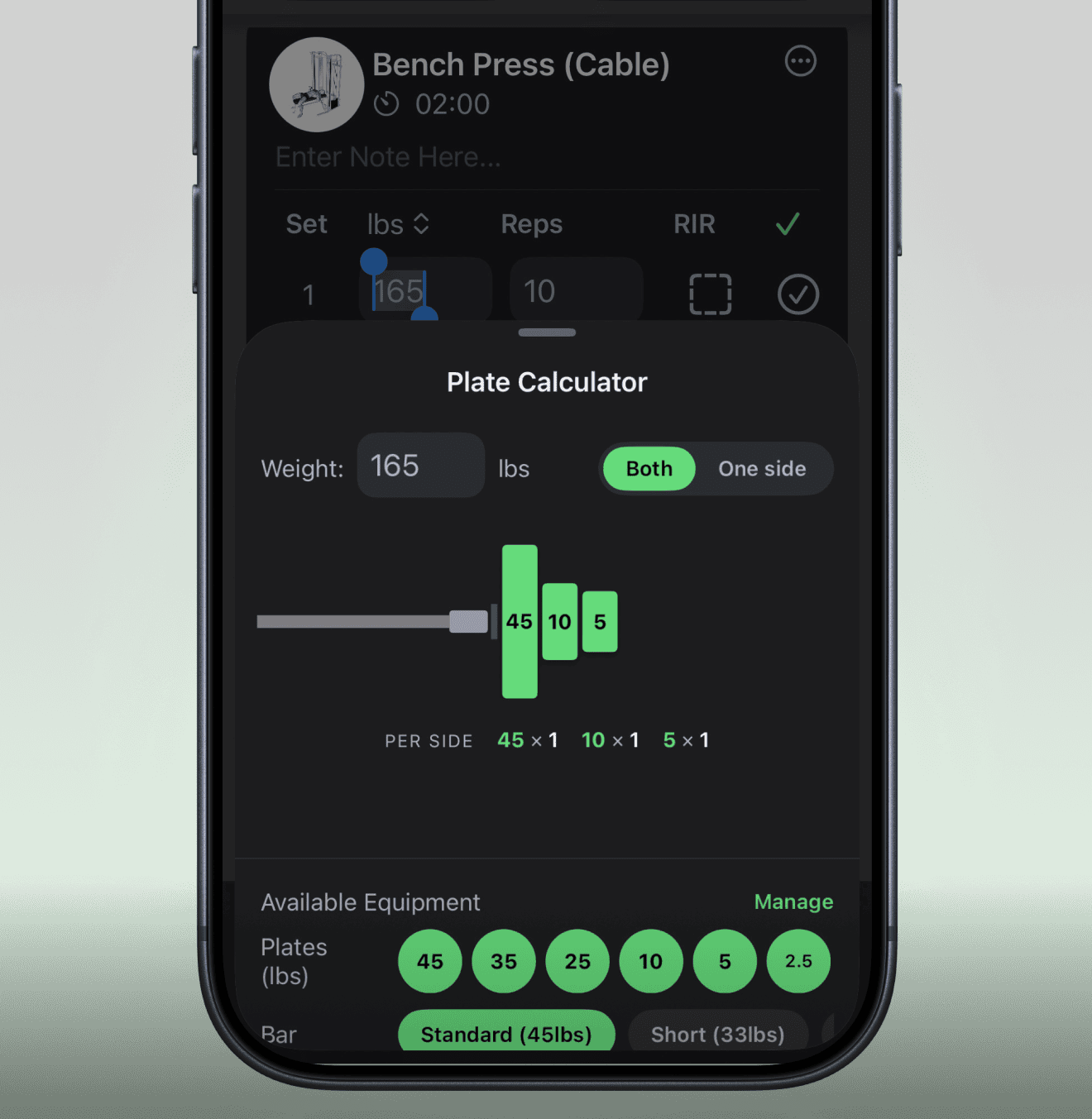
Plate Calculator
See exactly which plates to load for any target weight. FITIV supports standard, short, and EZ bars so there is no math, no second-guessing, and no wasted time at the rack.
Weightlifting Settings
Set your default rest timer duration, RIR tracking preferences, warm-up and cool-down exclusion rules, and template-save behavior once. FITIV remembers how you train.
Personal Record Indicators
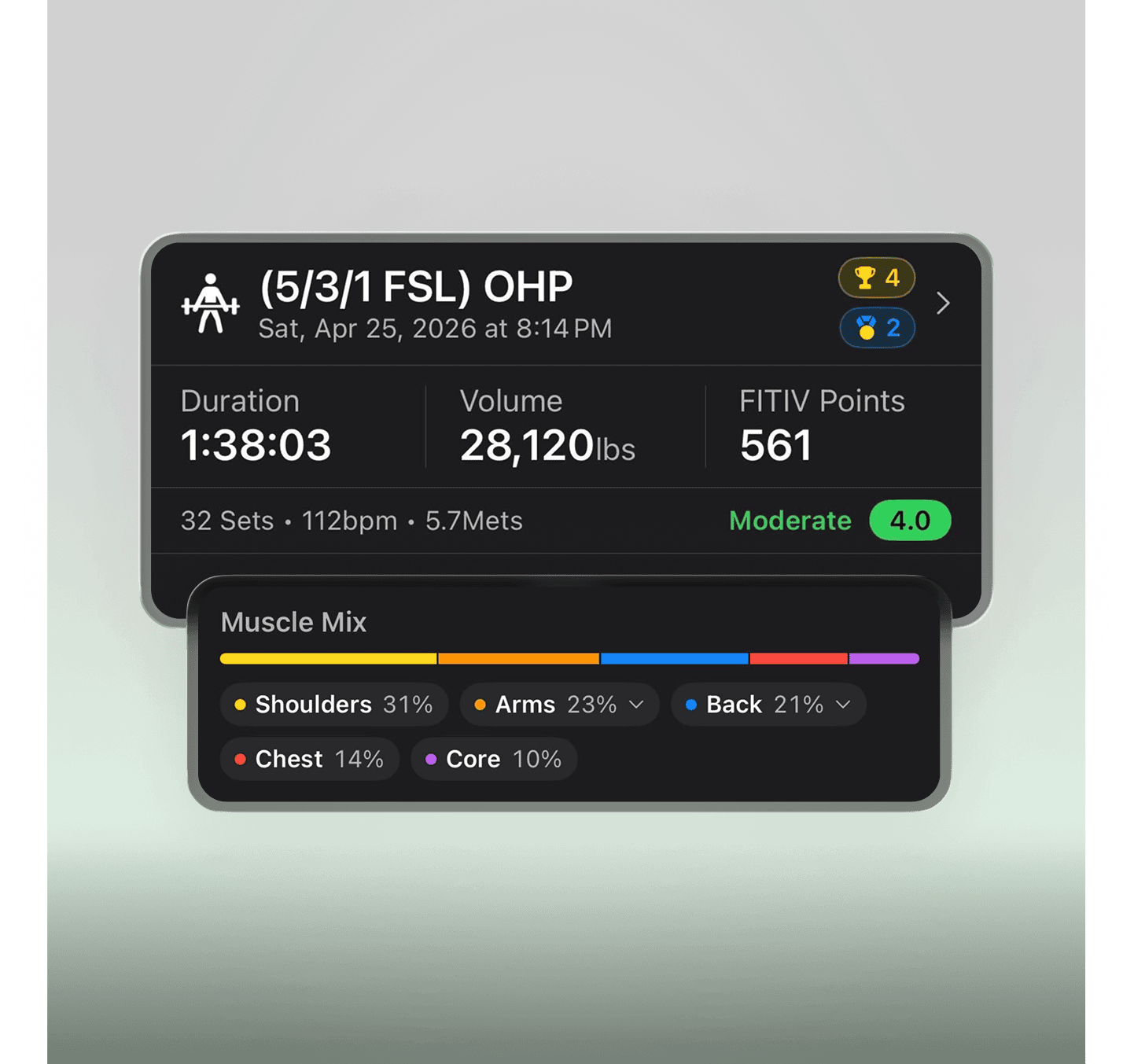
PRs now surface directly in your post-workout summary the moment you hit them. No digging through history, no guessing. If you set a new personal best, you will know immediately.
Per-Workout Muscle Group Breakdown
See a clear breakdown of how each session distributed work across your muscle groups. Over time, this helps you spot imbalances, confirm your programming is hitting the right targets, and make informed adjustments.

Text and Image to Workout
Scan a written routine or describe one in plain text and FITIV builds the training template for you instantly. If your coach sends a program as a photo, point your camera at it. If you have a routine in your head, just describe it. FITIV structures the session and gets it ready to go.
Why FITIV Is the Best Weightlifting App for Apple Watch
FITIV is built for athletes who want more than a rep counter.
Unlike single-purpose strength apps, FITIV combines:
- Structured strength tracking with Progressive Overload and RIR
- Rep and set logging on Apple Watch
- Plate Calculator for accurate loading at the rack
- Personal records tracked automatically
- Per-workout muscle group distribution
- Heart rate and intensity zones during every session
- Recovery Score, HRV, and Training Readiness between sessions
- Training Load, Strain, and long-term performance insights
- Cardio, conditioning, and health metrics in a single app
This makes FITIV one of the most complete weightlifting and health tracking apps available for Apple Watch users, especially for those who want serious strength data without managing multiple subscriptions.
Frequently Asked Questions
What is RIR tracking and why does it matter for weightlifting?
Reps In Reserve (RIR) measures how many reps you could have done before reaching failure. Research suggests that tracking RIR gives a more accurate picture of training intensity than volume alone, and helps FITIV's Progressive Overload recommendations account for effort, not just numbers.
How does Progressive Overload work in FITIV?
FITIV analyzes your recent performance data and automatically suggests increases to your weight, reps, or sets. The recommendation adapts based on what you have been lifting and how hard recent sets have felt, using RIR data when available.
Can I use the Plate Calculator for different bar types?
Yes. The Plate Calculator supports standard barbells, short bars, and EZ bars. Enter your target weight and FITIV shows you exactly which plates to load on each side.
How do I create a workout template from a photo?
Use the Text and Image to Workout feature. Open a new template, select the scan or describe option, and point your camera at any written routine. FITIV reads the exercises, sets, and reps and builds the template automatically.
Where do I see my personal records in FITIV?
Personal records now appear directly in your post-workout summary after each session.
Available Now
FITIV Pulse 10.9 is rolling out today. Update the app to start using Progressive Overload, RIR Tracking, the Plate Calculator, and every other feature in this release.
If you have feedback or run into anything while testing, drop it in the community at r/fitiv_app. Your input shapes what comes next.
The FITIV Team
.png)
.jpg)