

Heart rate zone training takes the guesswork out of how hard you're working. Because each zone is tied to your heart rate, you can aim at a specific adaptation (building aerobic base, raising lactate threshold, or improving VO2 max) instead of training at whatever intensity feels hard. FITIV Pulse tracks your time in each zone automatically in every workout, so you can see how your week splits between easy and hard.
What are Heart Rate Zones?
Heart rate zones are ranges of heart rate, usually set as percentages of your maximum heart rate. Each range draws on different energy systems and, trained consistently, produces different adaptations.
FITIV uses the five-zone model, one of the most common systems in endurance training:
| Zone | % of Max HR | Primary Fuel | Primary Adaptation |
|---|---|---|---|
| Z1 Warmup | 50–59% | Fat | Active recovery, blood flow |
| Z2 Fitness | 60–69% | Mostly fat | Mitochondrial density, fat oxidation |
| Z3 Endurance | 70–79% | Mix of fat and carbs | Lactate clearance, aerobic efficiency |
| Z4 Hardcore | 80–89% | Mostly carbohydrate | Lactate threshold elevation |
| Z5 Red Line | 90–100% | Carbohydrate (anaerobic) | Cardiac output, VO2 max |
In the app, your zones are labeled Zone 1 through Zone 5 by default (you can rename them); the nicknames above describe how each one feels.
These boundaries are approximations. People vary a lot, and zones based on a percentage of max HR are less precise than zones anchored to lactate or ventilatory threshold testing. Without lab access, though, they're a practical framework that works for most athletes.
How Heart Rate Zones are Calculated
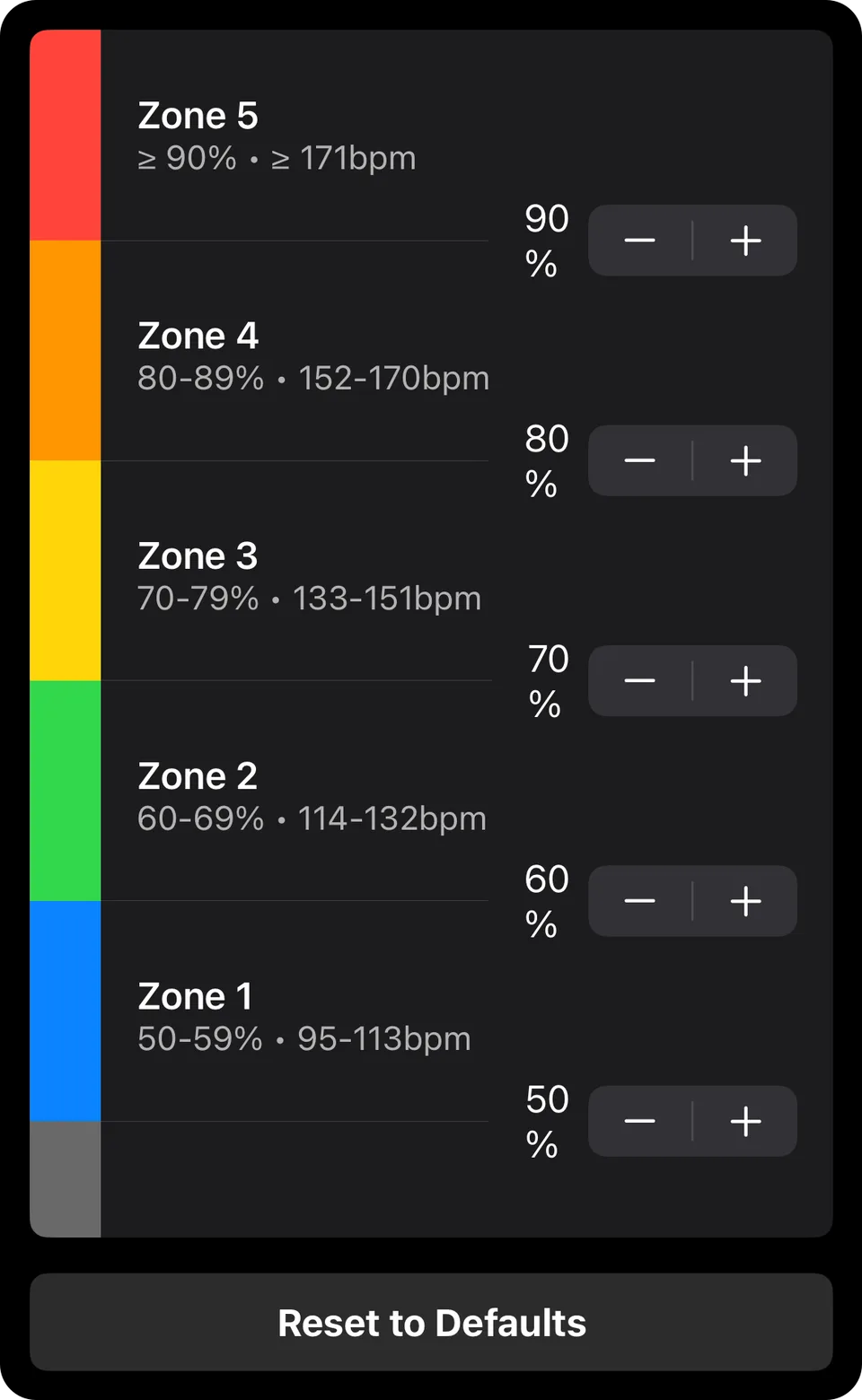
FITIV calculates your zone boundaries from your maximum heart rate, which you'll find under Heart Rate on the More tab. By default, it estimates max HR from your age with the Tanaka formula (208 − 0.7 × age), which updates as you get older. You can switch to the Haskell & Fox (220 − age) or Nes (211 − 0.64 × age) formula, or enter your maximum HR manually if you know it from a laboratory test or a verified field test.
The most common formula for estimating maximum HR (220 minus age) has a standard deviation of approximately ±10-12 bpm and is unreliable for individual use. Formula estimates are a starting point only. If a hard effort shows your true max is different, enter it manually. FITIV also watches for this: when a recent workout tops your current max, it asks whether you'd like to Update Max Heart Rate to the new number.
FITIV's default zones are percentages of max HR (Zone 1 from 50%, Zone 2 from 60%, Zone 3 from 70%, Zone 4 from 80%, Zone 5 from 90%). With the Training Method setting on the same screen, you can instead base zones on heart rate reserve, or on your lactate threshold heart rate if you've been tested, and you can adjust individual zone thresholds manually. To preview your zones with any of these methods, try our heart rate zone calculator.
Zone 2: The Foundation of Aerobic Fitness
Zone 2 training (60–69% of maximum heart rate) is the most important zone for most athletes, and also the most neglected. At Zone 2 intensity, your body primarily metabolizes fat, which requires abundant mitochondria in slow-twitch muscle fibers. Extended Zone 2 training stimulates mitochondrial biogenesis (the creation of new mitochondria), increases fat oxidation capacity, and improves the efficiency of your aerobic energy system.
As a result, athletes with a large aerobic base can sustain higher absolute speeds at lower relative effort. Their Zone 3 pace becomes what was once their Zone 4 pace, because the underlying aerobic machinery has improved.
Zone 2 takes discipline. The correct effort feels almost too easy: conversational pace, low perceived exertion. Most self-coached athletes drift into Zone 3 during intended Zone 2 sessions without realizing it, which reduces the stimulus for the specific adaptations Zone 2 produces.
Zone 3 and Zone 4: Threshold Development
Zone 3 (70–79% max HR) is sometimes called "no man's land" in endurance coaching: it is hard enough to accumulate significant fatigue but not intense enough to produce the strongest lactate threshold adaptations. Heavy Zone 3 training can lead to chronic fatigue without proportional fitness gains.
Zone 4 (80–89% max HR) corresponds roughly to lactate threshold, the highest sustained effort at which lactate production and clearance are balanced. Training at and slightly above lactate threshold raises the threshold ceiling, allowing you to race faster at aerobic effort. Classic threshold workouts (20-40 minute tempo efforts, Lactate Threshold intervals) target this zone.
Zone 5: VO2 Max Development
Zone 5 (90-100% max HR) represents maximum aerobic effort. At these intensities, the cardiovascular system is working at or near its maximum oxygen delivery capacity. Intervals in Zone 5, typically 3-8 minutes in duration with equal or longer recovery, produce improvements in maximal cardiac output and VO2 max.
Zone 5 work is highly stressful and requires adequate recovery. Most serious endurance athletes perform Zone 5 work 1-2 times per week at most, with the balance of training in Zones 1-2.
How FITIV Tracks Heart Rate Zones
FITIV records heart rate throughout every workout via Apple Watch or a connected Bluetooth HR monitor and assigns each sample to a zone. Post-workout, you see exact time spent in each zone, displayed as both raw time and percentage of total workout duration.
That detail matters most for intervals, where you move between zones constantly. On a 5 × 4-minute session in Zone 4, for example, the breakdown will typically show a good chunk of time in Zone 3 (during incomplete recovery between intervals) and brief excursions into Zone 5 (toward the end of each interval), which tells you whether the session went as planned.
The Heart Rate Zones card on the Today tab adds up your time in each zone across your workouts. Tap it to see your distribution over anything from 7 days to 2 years, and use Zones Included to focus on the zones you care about, such as Zone 2 alone. Endurance athletes tend to follow a polarized distribution: about 80% of sessions at low intensity (below the first lactate threshold) and about 20% hard, with relatively little time in between. In a 9-week trial of well-trained athletes, a polarized program improved VO2 peak more than threshold, high-volume, or high-intensity programs (Stöggl and Sperlich, 2014). Because hard sessions include easy warm-ups and cool-downs, the share of total time at low intensity is often even higher.
Why Heart Rate Zone Training Matters for Athletes
Elite endurance athletes in every sport structure their training around zones, and the reasoning is well established: specific intensities produce specific adaptations. Training that blends the zones together tends to produce weaker versions of each.
For recreational athletes, zone tracking primarily serves as a check against the most common training error: training at a moderate intensity that is too hard to produce aerobic base adaptations and too easy to produce threshold or VO2 max adaptations. Real-time zone feedback helps here: FITIV's Voice Coaching can announce each zone change, and on Apple Watch, Heart Rate Zone Change Haptics tap your wrist when you cross into a new zone. Post-workout zone analysis then shows whether you stayed where you meant to.
Frequently Asked Questions
Should I use a chest strap or Apple Watch for zone training?
For steady-state activities like running and cycling, Apple Watch optical HR is generally adequate for zone tracking. For high-intensity interval training with rapid HR transitions, chest straps (Polar H10, Wahoo TICKR) produce more accurate zone time data, because they read the heart's electrical signal directly while optical sensors lose accuracy when heart rate jumps quickly. No sensor is instant, so in 30-second intervals judge your zone by the trend rather than a single reading.
How do I know if my max HR is accurate in FITIV?
Check your max HR setting in the app against the highest HR you've ever recorded in any workout. If you've worn a monitor during a truly maximum effort (an all-out sprint, a race finish, or a max HR test), that number is likely more accurate than any formula. If your recorded peak is higher than your current setting, update your max HR under More → Heart Rate.
What percentage of my training should be in Zone 2?
Research on elite endurance athletes across multiple sports shows a consistent pattern: about 80% of sessions at low intensity (below the first lactate threshold) and about 20% hard, with relatively little time in between. Because hard sessions include easy warm-ups and cool-downs, the share of total time at low intensity is often even higher. Several studies have found this works as well as or better than piling up moderate-intensity training. Most recreational athletes train too much in Zone 3 and not enough in Zones 1-2 or 4-5.
Can I use heart rate zones for strength training?
HR zones are less meaningful for strength training because heart rate during lifting reflects effort but not metabolic load in the same way as continuous aerobic exercise. FITIV still tracks your heart rate and zones during strength sessions, and they count toward your training load through TRIMP. For a fuller picture of a lifting session, the Effort Minutes method (your Perceived Effort × duration) captures how hard it felt, and your sets, reps, and weight are tracked in your workout history.